
A safer status board for Australian trust-account blockers
May 27, 2026
9 min read
The sales team usually does not need to see the trust ledger.
They do need to know whether a deal is blocked because the deposit hasn’t been receipted, accounts is waiting on evidence, the principal needs to review a release request, or the buyer has asked a question the agent shouldn’t answer from memory.
That distinction matters in Australian agencies because trust money has its own rules. NSW Fair Trading says trust funds must be held for the client and used only as that client directs, and only the licensee in charge may authorise withdrawals from a NSW trust account. Consumer Affairs Victoria’s guidance on accounting for trust money is just as direct about full accounting records, next-business-day updates, reconciliations, and auditability.
For a newer agent, this can feel awkward. A buyer asks, “Has my deposit cleared?” A vendor asks, “Can the deposit be released before settlement?” The agent wants to help, but the answer sits somewhere between sales progress, legal direction, accounts, and principal approval.
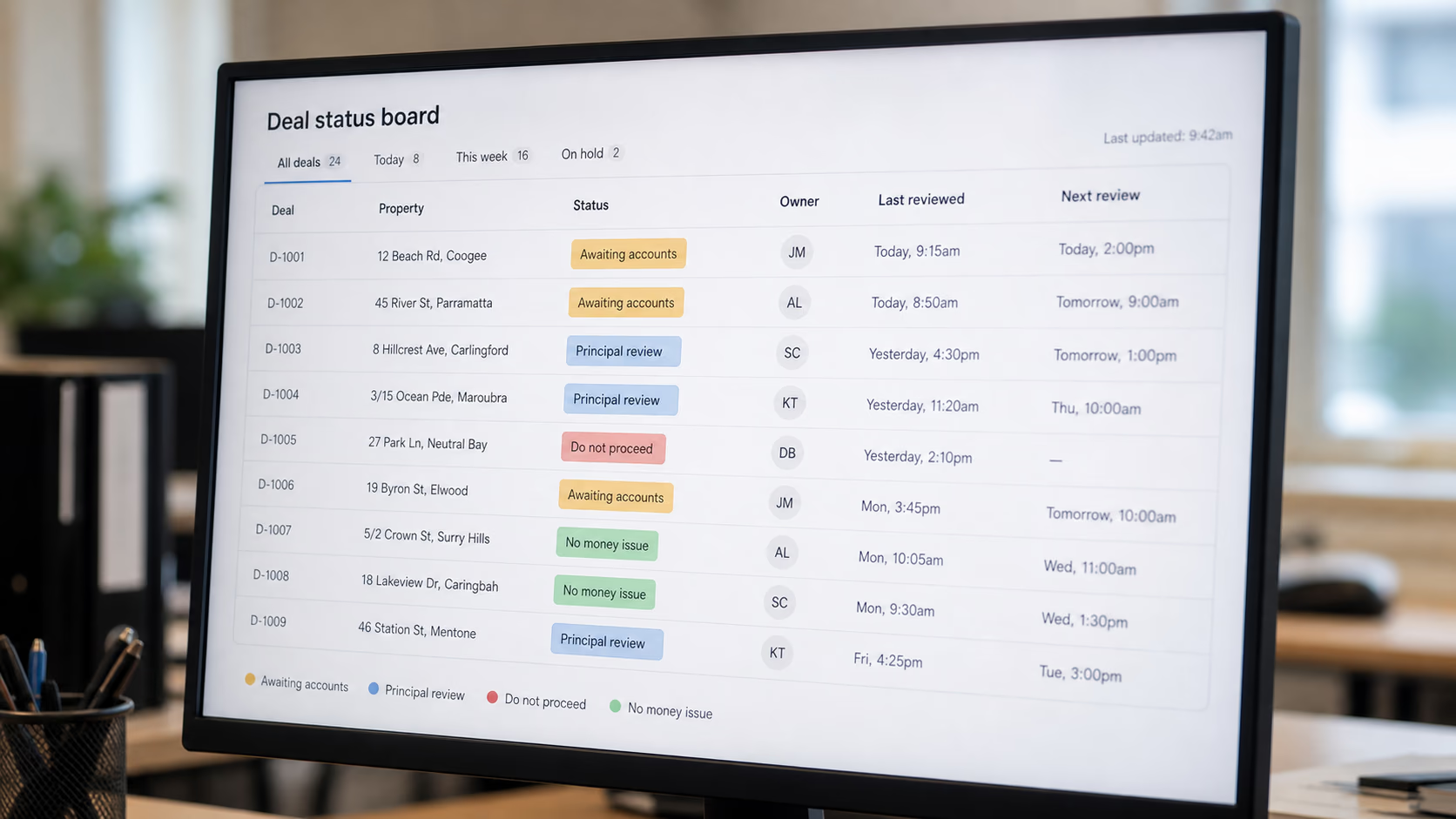
A small, controlled status board can show the safe operational state of a deal without exposing the accounting record behind it.

The board translates accounting status for sales
A trust-account status board shouldn’t hold ledger balances, bank details, receipt numbers, client directions, or private finance notes. Those belong in the trust accounting system.
The board should translate accounting-adjacent work into 4 things sales can safely act on:
| Field | Why it belongs on the board | What it should not contain |
|---|---|---|
| Status label | Tells the agent whether the deal can move | Ledger balances or bank account details |
| Owner | Shows who is responsible for the next check | Shared “accounts” inbox with no person named |
| Next action | Gives sales one clear thing to do or not do | Legal advice, accounting judgement, or client directions |
| Review time | Stops old blockers sitting unnoticed | Audit notes, reconciliation detail, or sensitive documents |
“Deposit issue” causes chasing. “Awaiting accounts confirmation, owned by Priya, review by 3pm” tells the team where the work sits.
If you want the broader Australian operating context, we have also written about why Australian CRM breaks at the inspection, not the contact record. The board here is narrower: what sales can see safely when trust-account-adjacent work could affect the deal.
Use labels that tell people what to do next
Bad labels describe a problem. Good labels create a decision.
Start with these 5 labels:
| Label | Meaning | Who can apply it | What sales can say |
|---|---|---|---|
| No money issue | There is no known trust-account blocker affecting the next sales step | Accounts, principal, authorised admin | “There is no finance blocker showing on our side.” |
| Awaiting accounts | Accounts needs to confirm receipt, allocation, or status before sales comments | Sales can request, accounts updates | “I am checking that with accounts and will come back to you.” |
| Trust process required | A formal trust-account process is needed before the deal moves | Accounts or principal only | “That needs to go through our trust-account process first.” |
| Principal review | The principal or licensee in charge must decide or approve the next step | Principal or authorised delegate | “That is with the principal for review.” |
| Do not proceed | Sales must pause a specific action until the blocker clears | Principal, accounts lead, compliance owner | “We cannot move that forward until the required check is complete.” |
The labels are deliberately plain. They don’t pretend the sales agent is making an accounting decision, but they still give the agent words to use.
The danger label is “Pending”. Pending what? A receipt? A release authority? A solicitor reply? A missing invoice? If a label doesn’t tell the next person what to do, split it.
Decide who can see, request, and change each status
The permissions are the point. Without them, the board becomes another comments field where people drop half-sensitive notes and hope someone notices.
Use 3 permission levels:
| Role | Can see | Can request | Can change |
|---|---|---|---|
| Sales agent | Status label, owner, review time, approved client wording | A status check or escalation | Nothing except their own sales note |
| Sales manager | All sales-visible fields across team deals | Escalation and missing-owner checks | Sales owner and urgency marker |
| Accounts, principal, or authorised admin | Status label, owner, next action, restricted reference | All checks | Trust-status label and clearance note |
That last column matters. If a sales agent can change Trust process required to No money issue, the board has lost its value. The agent can request a check. The accountable person clears it.
AvaroAI is built around this kind of permissioned visibility. The sales team can see the label that affects their next call, while finance or the principal controls the sensitive status behind it. The design choice is intentional: shared visibility helps people move, but unrestricted editing creates risk.
Build escalation into the label, not into memory
Trust-account blockers often sit between teams. They do not always look urgent at first.
A buyer says the deposit has been sent. The sales agent marks the deal as awaiting accounts. Accounts is buried in end-of-month work. The vendor calls before lunch. By 4pm, the agent has promised an update twice and the manager hears about it too late.
Fix that with review times and escalation rules:
| Status label | Review time | Escalates to | Escalates when |
|---|---|---|---|
| Awaiting accounts | Same business day | Accounts lead | No update by the review time |
| Trust process required | Next business day unless urgent | Principal or licensee in charge | Client is asking for action before process completes |
| Principal review | Time set by principal | Principal and sales manager | Review time passes with no decision |
| Do not proceed | Daily until cleared | Principal and sales manager | Any client-facing deadline is within 24 hours |
The goal is to remove hidden admin: chasing, rechecking, asking the same person twice, or leaving a sales agent to improvise because no one gave them a safe answer.
NSW guidance on real estate trust accounts and audit requirements is a useful reminder of why this is not casual work. The licensee in charge has specific responsibility for trust-account withdrawals in NSW. A status board should support that responsibility, not blur it.
Keep the board out of the ledger
Hold this line: the board records operational status and keeps accounting evidence in the trust accounting system.
Put these in your trust accounting software or formal files:
- Receipt numbers
- Ledger balances
- Bank statements
- Reconciliation notes
- Written directions for release or payment
- Audit working notes
- Copies of trust-account records
Put these on the status board:
Awaiting accountsPrincipal review- Owner name
- Next safe sales action
- Review time
- Restricted reference such as “see accounts file” or “see trust record”
Western Australia’s real estate and business agents’ trust account handbook says agents who hold or receive money for others must maintain trust accounts, and the records must show the state of the trust account at any time. That is a formal recordkeeping duty, not something to recreate in a sales board.
Commission questions can get messy here. A vendor may ask whether commission will be deducted from funds held at settlement. An agent may need to know whether there is a finance blocker, but they don’t need the whole commission worksheet.
When teams compare real estate commission software in Australia, this same boundary often gets lost. Sales trust-account questions need status visibility, not open access to calculations. The same boundary appears in commission pay runs go wrong long before payday.
A 20-minute setup routine for tomorrow
You can build the first version without changing accounting systems.
- Pick 1 live sale where a deposit, receipt, release, invoice, or settlement-money question has already caused chasing.
- Add the 5 labels:
No money issue,Awaiting accounts,Trust process required,Principal review,Do not proceed. - Name the only people who can change each label.
- Add owner, next safe action, review time, and 3 approved client phrases.
- Test the board on that 1 deal for a week before adding every sale.
Check these before the board goes wider:
- Can sales understand the status without seeing trust-account records?
- Can accounts tell which deals need attention?
- Can the principal see anything requiring review today?
- Is the board free of ledger balances, receipt numbers, bank details, and audit notes?
If the answer to any of those is no, fix the board before it goes live across the office.

What AvaroAI should do here
This belongs in an operations platform because the sales record is where the next client conversation happens. The trust accounting system remains the source of truth for formal accounting records.
In AvaroAI, the practical pattern is simple: the deal carries a permissioned status label, the task is linked to the listing or transaction, and the sensitive finance record stays with the people allowed to manage it. Sales sees the next safe action. Managers see blockers across active deals. Accounts doesn’t have to explain the same status 5 times.
That is the standard to aim for, whatever tools you use. The board should make the next safe action visible without turning every salesperson into a trust accountant.
Related reading
Disclaimer: This page may contain AI-assisted content. The information is provided solely as a general guide and may not be correct, complete, or current, including, but not limited to, our full or applicable service offerings. While we strive for accuracy, no guarantee is made regarding correctness or completeness, and no expectation should be made as such. Please contact us directly to confirm any details before utilizing our service.